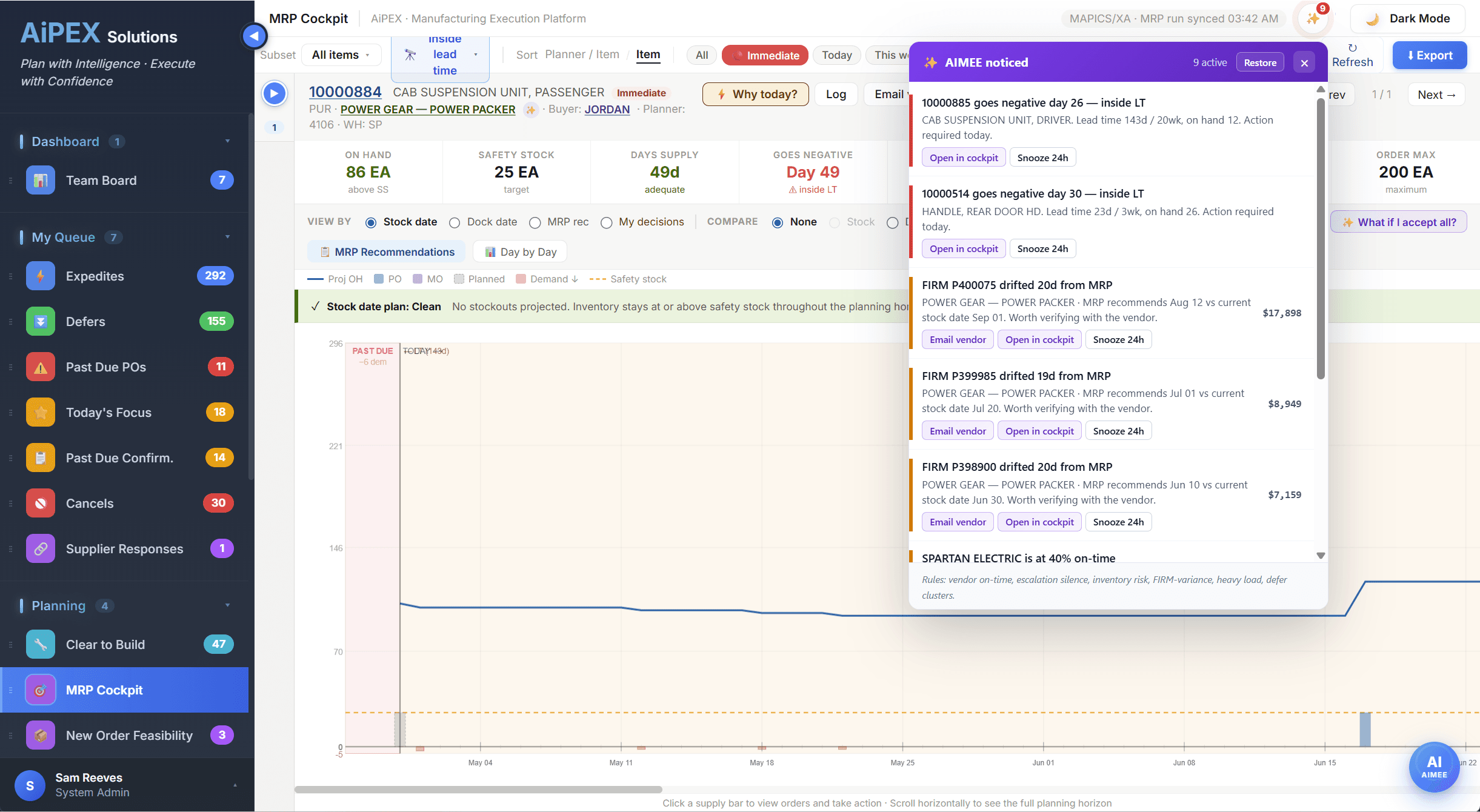
Your AI planning expert. Grounded in your ERP data.
AiMEE reads your live ERP data every night. Not a summary. Not an export. The actual fields.
When your team logs in, she briefs each buyer by name — what changed, what's inside lead time, what's costing money — in plain English.
Ask her anything. She drafts vendor emails one supplier at a time, opens cycle count adjustments, runs feasibility checks on a customer order. Every answer traces back to a specific record in your ERP environment.
Grounded in your data, not the internet. Read-only. Nothing leaves your control.
When your team arrives, the list is already ranked. They work it. AiMEE builds the next one overnight.
Every planning surface. Built from overnight MRP.
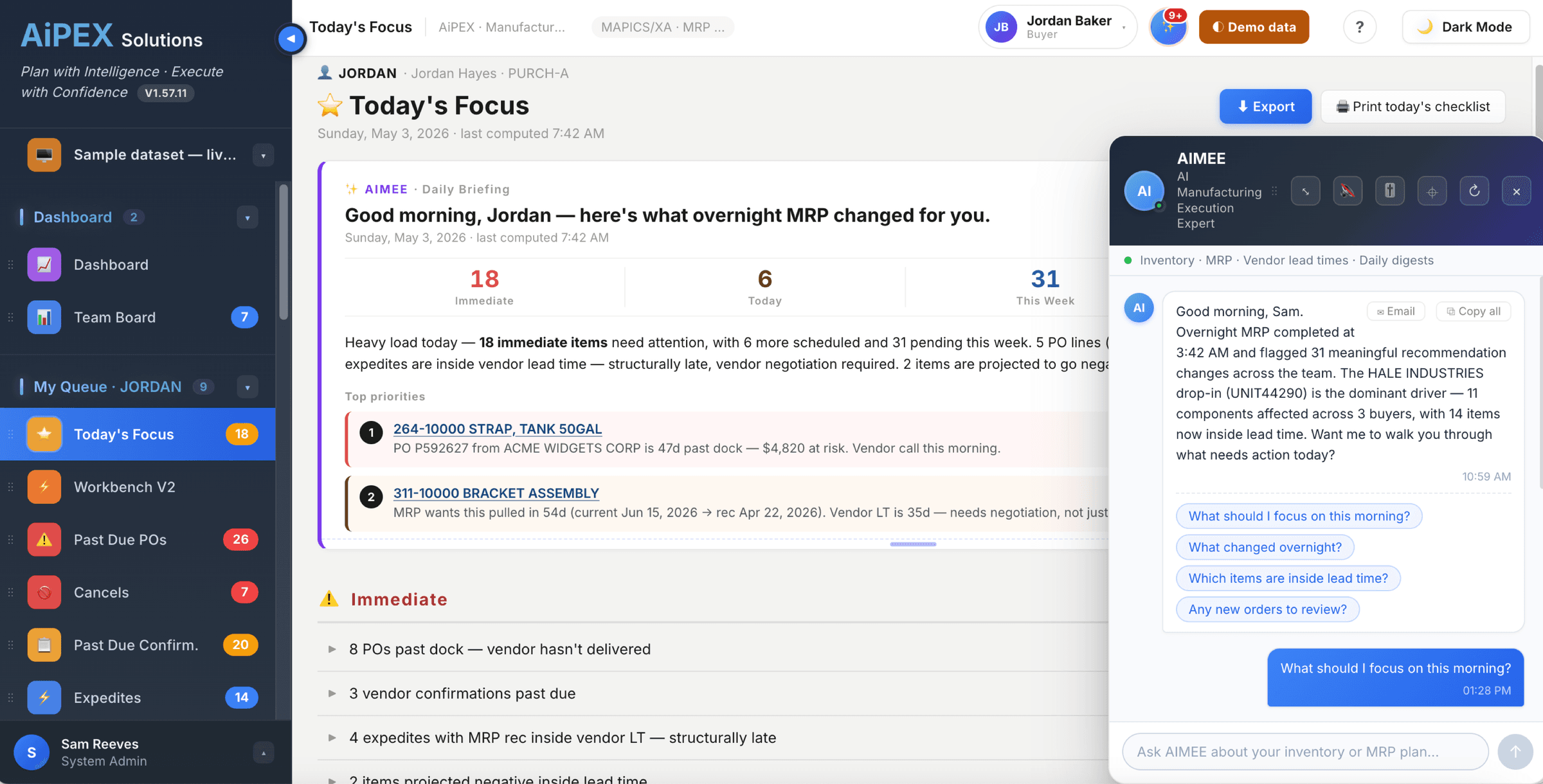
Those five screens are the morning. There are about fifty more behind them.
AiPEX keeps growing where buyers told us it hurt. Here is what has landed most recently.
The assistant your buyers actually talk to.
- Standing instructionsAiMEE remembers how each person works — their plants, their vendors, the rules they always apply — and carries it into every answer.
- Saved conversationsThreads persist. A question you park on Friday still has its context on Monday.
- Explain this screenAsk what any screen or field means without leaving it. New buyers stop needing a shadow week.
- Works in SpanishFull Spanish-language support for bilingual teams.
The deep-work screens behind the daily list.
- Item MRPEvery MRP input and recommendation for a part, on one screen.
- WaterfallHow the plan for a part has moved, period over period.
- Lead Time AnalysisQuoted lead time against what your vendors actually deliver.
- ABC AnalysisClassify items by value and movement, so effort follows dollars.
- Obsolete AnalysisFind inventory that has stopped moving before it is written off.
- NervousnessSurface the parts whose MRP recommendation keeps changing — the ones eroding trust in the plan.
- 360 pagesOne consolidated page each for an item, a vendor or a PO, with every related record attached.
Getting answers out of vendors, without chasing.
- Vendor Confirm portalVendors acknowledge POs straight from a link in an email. No login to issue, no software for them to install.
- Quote LiteSend quote requests and track who has responded, in one place instead of a mailbox.
- Source ScoutAiMEE searches the web for alternate suppliers when your usual source cannot deliver.
Getting work back out of AiPEX.
- Report WriterDescribe the report you want in plain English, schedule it, and have each vendor or buyer receive only their own copy.
- ERP UpdatesChanges go into a queue, someone approves them, and then they are written back to your ERP with an audit trail.
What your IT group asks about first.
- Microsoft single sign-onSign in with the Microsoft account your team already has. No separate AiPEX password to manage or revoke.
- GCC HighSupported for defense and aerospace customers on Microsoft's government cloud.
Not the full list. Ask for a walkthrough and we will show you the screens your team would actually live in.
Every role in the building sees the same picture — without anyone retyping a number.
AiPEX rolls daily buyer reality up to the metrics managers and executives need.
Arrive to a list, not a search.
You don't open MRP. You don't dig through past-due reports. AiPEX did that overnight — what's critical, why, and what it'll cost if it slips. You spend the day acting on the list. AiPEX builds the next one while you sleep.
- →First hour stops being triage
- →Nothing falls through the cracks of a manual process
- →Every morning starts with what matters most
- →AiMEE drafts your vendor emails — one per supplier, with their POs pre-loaded
See the team's morning before the team does.
Your buyers are good. The work is just bigger than any one person can hold in their head. AiPEX gives you the team view they can't see for themselves — who's heavy today, who has capacity, where the team is losing money.
- →See trouble while there's time to react
- →Balance load in the morning, not after burnout
- →1:1s grounded in specifics, not generalities
- →AiPEX connects to your ERP environment overnight — no dashboard to build, no report to configure
Working capital visibility — before the month-end report.
Skip the monthly deck. AiPEX rolls daily buyer reality up to department-level health — past-due dollars, expedite recovery, follow-up discipline, excess exposure. The metrics that move before the financials do.
- →Early indicators, not lagging ones
- →Procurement stops being a black box
- →Safety stock benchmarked against the 50% rule, dollarized and ranked — one click generates the CFO report
- →Multi-plant? AiPEX consolidates across ERP environments — one view, every division
Not another ERP project. Not another spreadsheet. Not another chatbot.
Three real alternatives. Here's how AiPEX is different from each.
Live in days on the system you already run.
Modern ERP migrations run 18 months and seven figures — and finish with your team learning a new system. AiPEX points at your existing ERP environment and shows you your data in 45 minutes. Your ERP stays exactly where it is, and stays the system of record.
- →Connects to the ERP you already run
- →No migration, no data cleanup, no re-training
- →Your ERP remains the system of record
Prioritized by dollars. Approved before anything is written.
Excel exports don't rank by financial impact. Green screens don't remember what your vendors actually do. Both create shadow systems your team stops trusting. AiPEX ranks every open issue by real cost — and every change queues for someone's approval before it is written back to your ERP with an audit trail.
- →Ranked by dollars and days until impact
- →Queued for approval, then written back to your ERP
- →Full audit trail — no shadow system
Grounded in your ERP data, field by field.
ChatGPT can't read your ERP system. Generic AI copilots hallucinate part numbers and vendor names because they're not connected to your source of truth. AiMEE reads live from your ERP system — every answer traces back to a specific record.
- →Live reads from your ERP environment
- →Every answer citation-backed to a record
- →Nothing sent to the public internet
You work the list. AiPEX helps you work it.
The list isn't the destination — it's the start. Every past-due PO, every vendor follow-up, every expedite request needs a conversation. AiPEX drafts it.
- →One personalized email per vendor. Group action items by supplier automatically. Each vendor sees only their POs, not the whole list.
- →Templates with embedded data. Past-due reminders, expedite requests, confirmation chase-ups — the PO grid is generated from live ERP data, not hand-keyed.
- →Tone & translation, on demand. Adjust register for the relationship. Translate to the vendor's language without breaking the embedded table.
- →Tracked until it closes. Every sent email becomes a follow-up commitment AiPEX watches — so an unanswered chase doesn't quietly age out.
- →Queued for your approval, then written back. Nothing reaches your ERP until someone signs it off. Approved changes are written back with an audit trail, so your system of record stays the system of record.
Built by people who've lived in the MRP world for 30+ years.
AiPEX is built by a small team of engineers and manufacturing operations experts who've spent their careers on the shop floor and in front of MRP screens. We've done the job, trained the buyers, and improved the process. Across ERPs (Infor XA/MAPICS, SAP, Oracle) the pattern is the same: opening the same screens, chasing the same past-due POs, rebuilding the same spreadsheets. Every morning. For decades. AiPEX is what we built to end that.
This isn't an AI product looking for a manufacturing use case. It's a manufacturing product that happens to use AI where it earns its place.
Answers to commonly asked questions about AiPEX
ARCHITECTURE & DEPLOYMENT
The server is written in C#/.NET, and the user interface is Angular/TypeScript. The ERP integration layer uses standard SQL views over Db2 for i.
There is no Java dependency.
Either.
Most manufacturers can run AiPEX on a Windows VM inside their network, close to the IBM i. We can also host AiPEX in AWS if the customer prefers not to manage the application server.
The software and functionality are essentially the same in either deployment model.
The typical installation requires:
- A Windows Server VM
- Approximately 4 vCPU, 16 GB RAM minimum and 50 GB of disk
- SQL Server 2019 or newer for AiPEX application data; SQL Server Express is sufficient for many installations
- IBM i Access ODBC driver
- An IBM i user profile for the AiPEX connection
- Browser access to the AiPEX application
- Optional outbound HTTPS access if AI functionality is enabled
AiPEX reads ERP data through read-only views. Changes your team makes in AiPEX do not go straight to the ERP — they collect in an approval queue, and only once a person approves them are they written back, each with an audit trail.
Nothing needs to be installed on individual user PCs. Users access AiPEX through their browser.
We also support containerized deployment for customers who prefer that architecture.
AiPEX is not licensed or sized by user count.
A single AiPEX installation can support many users, plants and environments associated with the same IBM i partition. Shared ERP queries are cached briefly to minimize unnecessary traffic against the IBM i.
As data volume grows, additional CPU and memory can simply be added to the application server.
Multiple IBM i partitions are treated as separate licensed systems.
Current versions of Microsoft Edge, Google Chrome and Firefox are supported.
There are no plugins, ActiveX controls or client installations required.
No.
AiPEX does not use Java. The server is deployed as a self-contained .NET application.
ERP DATA & INTEGRATION
Only after a person approves it.
Reading and writing are deliberately separate. AiPEX reads through a documented set of read-only views, so nothing your team does while reviewing or analysing can alter the ERP.
When someone acts on a recommendation, that change does not go to the ERP. It collects in an approval queue, where a named person reviews it and either approves or rejects it. Only approved changes are written back.
Every written change carries an audit trail: what changed, who approved it, and when. Your ERP remains the system of record, and there is no shadow system holding decisions outside it.
Yes.
AiPEX accesses ERP data through a documented set of read-only views that establish a consistent interface between the ERP and AiPEX.
Typical data includes:
- Sites and warehouses
- Items and inventory balances
- Vendors and vendor contacts
- Buyers and planners
- Purchase orders
- Manufacturing orders
- Customer orders
- Bills of material
- MRP recommendations and exception messages
- Demand and requirements
- Inventory transaction history
- MRP planning-run information
Our production integration today is with Infor XA.
For LX, the same Db2 for i integration architecture applies. The primary effort is mapping the appropriate LX files and fields into the AiPEX view specification.
We can provide the integration/view specification for review.
Yes.
AiPEX does not directly bind the application to individual ERP database columns. The integration views normalize ERP-specific field names, dates, numeric formats and data types into a consistent application interface.
This helps isolate AiPEX from differences between ERP platforms and versions.
If the source ERP itself limits or truncates a field, AiPEX will display the value available from the ERP.
There are several options.
Emails generated from AiPEX can automatically be retained against the related purchase orders.
Users can also attach an Outlook .msg, Gmail .eml, PDF or other document directly to a PO.
Copied email text can also be stored as a note or correspondence entry.
The PO history then provides a central record of related communications and attachments without modifying the ERP database.
Outbound email can use the customer's SMTP/Microsoft 365 environment or another configured mail service.
AiPEX connects directly to the IBM i.
When users open screens or request information, AiPEX queries the ERP over ODBC. A short cache is used where appropriate to reduce unnecessary repeated reads.
Users can also force a refresh.
MRP history is handled slightly differently. When AiPEX detects a completed MRP run, it can retain a snapshot so users can compare one planning run to another.
AiPEX is not dependent on copying the ERP into a separate data warehouse.
AI & AiMEE
AiPEX currently supports Anthropic Claude models.
Customers can also configure AiPEX to use Claude through AWS Bedrock, including AWS GovCloud where appropriate.
The AI provider and model can be configured through AiPEX administration, and customers may use their own API credentials.
AI credentials are encrypted on the AiPEX server.
The underlying AI providers charge based on usage.
AiPEX tracks AI usage so customers can monitor consumption and establish alert thresholds.
We should confirm the commercial arrangement during implementation depending on whether the customer uses its own AI account or an AiPEX-provided service.
Not currently.
AiMEE uses the AI model's native tool-calling capability. AiPEX defines the tools internally, and those tools operate through the same controlled, read-only data layer used by the application.
Because the tool architecture is already defined, exposing selected AiPEX functionality through MCP in the future is certainly possible.
Some of the primary capabilities include:
- Ask plain-English questions about ERP and planning data
- Explain MRP recommendations and exceptions
- Draft vendor communications
- Summarize planning and purchasing issues
- Translate communications
- Analyze vendor responses
- Create notes and follow-up actions
- Perform planning what-if scenarios
- Produce buyer and management briefings
- Identify alternate suppliers
- Analyze specification documents
- Suggest vendor alternatives
- Build Report Writer reports from natural-language requests
AI-assisted actions are controlled within AiPEX and can require user confirmation before anything is committed.
We also have a more detailed AI capability document available.
The AiPEX application can run entirely on-premise, but the large language model itself typically runs through Anthropic or AWS Bedrock.
When AiMEE is used, AiPEX sends only the information required for the particular request rather than copying the ERP database to the AI provider.
All core AiPEX functionality continues to operate if AI functionality is disabled.
For environments with additional government or security requirements, AWS Bedrock/GovCloud can also be evaluated as part of the deployment architecture.
LICENSING
AiPEX is licensed by IBM i production partition, or LPAR.
A licensed system includes unlimited users and can support multiple environments, plants and sites associated with that partition.
There is no per-user licensing.
The entire package.
The subscription includes all AiPEX workbenches, dashboards, Report Writer and AiMEE functionality.
We do not license individual modules or users separately.
See your own data in AiPEX — in 45 minutes.
Point us at your ERP environment — read-only, no changes to your system. Within 45 minutes, we'll show you the past-due POs, excess inventory exposure, and buyer priorities hiding in your own data. Not a canned demo. Your environment.